


MANE: AI Hairstyle Pro
0.00.00 Reviews
App Specs
- Version
- 2.0.4
- Updated On
- License
- Free
- Downloads
- 10,000+
- Developer
- Elizabeth Cheyanne Langrum
- Categories
- Beauty
- Platform
- Android
Screenshots
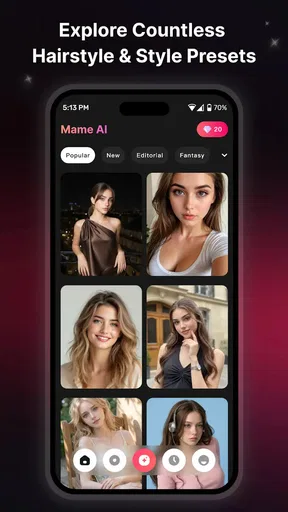
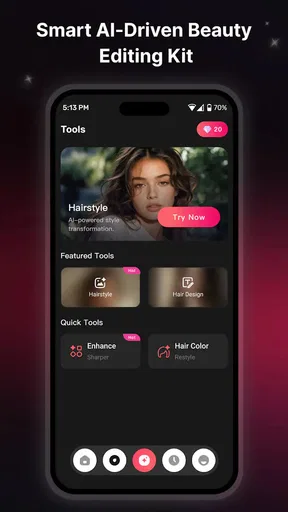
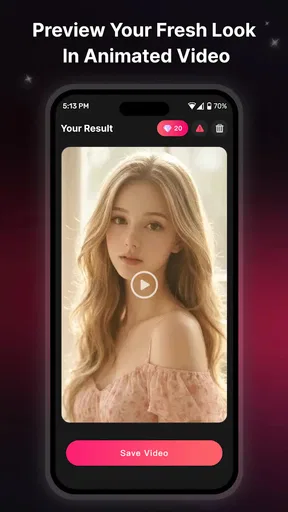
 Analysis by AppCompare
I like hairstyle tools best when they help me answer a practical question: “Would this look suit me enough to try it in real life?” MANE: AI Hairstyle Pro is built around that kind of low-stakes experimentation. It uses AI to turn a photo or a text prompt into hairstyle visuals, including moving video results. That makes it more of a look-preview and idea-generation app than a traditional beauty guide or salon booking tool.
A useful way to narrow down an idea
One detail I would consider before opening the app is what decision I actually need help with. “Should I change my hair?” is too broad to test meaningfully. “Would a fringe make my usual style feel fresher?” gives the results a clearer job. Starting with a small question makes it easier to compare outputs and less likely that a dramatic image will steer you toward a change you did not intend to explore.
I would also separate visual inspiration from practical salon planning. A generated result can help me identify a shape, length, or mood I like, but a stylist still needs to translate that idea into a cut that suits my hair and routine. If I am short on time, I would write down the two or three details I want to discuss while the image is open. That turns a quick phone experiment into a more useful appointment conversation.
Trying a new look without committing
In my view, the appeal is the chance to explore a change before sitting in a stylist’s chair. A haircut can be hard to picture from a reference image alone, especially when the model has different hair texture, face shape, or coloring. MANE gives you another way to imagine a style on a photo, while text-based creation can help when you have an idea but no exact reference to upload.
The video element is a notable distinction. A still image is useful for checking the outline of a fringe or the length of a bob, but motion can make a generated look feel more vivid and easier to share. I would treat the result as inspiration, not as a faithful preview of how a cut will behave in everyday life. AI imagery can suggest a direction; it cannot replace a stylist’s assessment of your hair’s texture, density, growth pattern, and upkeep needs.
Because this is a beauty app, the best use is focused experimentation rather than trying to settle every detail of a haircut. I would start with one clear idea—such as a shorter shape or a different part—then compare a few distinct directions. Asking for many changes at once makes it harder to tell which one helped, and a striking generated image is not necessarily a practical style for your routine.
How I would use photos and text
For a photo-based tryout, choose a clear image where your hair is visible and your face is not heavily obscured. That gives an AI tool a better visual starting point than a dim, angled, or busy picture. If you are comparing possible cuts, keep the source photo consistent between attempts. It is a simple way to make differences in the generated results easier to judge rather than confusing a changed pose or lighting with a changed hairstyle.
Worth Reading Before You Choose

Switching to Android Auto Means Rethinking Your Driving Routine

Google Calendar Makes a Crowded Week Easier to Manage

Baby Panda World Brings Quick Play to Modern Phones, but Its Game Library Feels Busy

ESPN’s Live Game View Makes Following Close Games Easier

QuizzLand Review: A Good Fit for Short Trivia Breaks, Not Every Player

Basketball Stars: Multiplayer Is Fast, but Can It Recover When Matches Go Wrong?
Text prompts are useful when you know the broad look but do not have a reference image. I would describe the hairstyle in a few concrete terms—length, shape, fringe, or general finish—instead of writing a long list of wishes. That keeps the request focused. A second prompt can then change one feature, such as the length, so you can see whether that particular adjustment moves the result closer to what you want.
One non-obvious trade-off is that a visually pleasing result may not be the most useful one. If you are deciding whether to cut long hair, for instance, a dramatic transformation can be fun to see but may not communicate the subtle variations you need to choose between. I would use the app to identify possibilities, save or show the most relevant concept, and then explain to a hairdresser what you like about it rather than treating the image as a precise instruction.
Who is likely to enjoy it
MANE should suit curious users who enjoy testing looks, people collecting ideas before an appointment, and anyone who finds it easier to react to a visual than to describe a hairstyle from scratch. It may also be handy when friends are helping each other decide between a couple of broad options: a generated image gives the conversation something more specific than “maybe shorter.”
A realistic everyday scenario would be planning a salon visit after work. You have a few minutes on your phone, a photo you are comfortable using, and an uncertain idea about changing your usual style. You can explore a couple of options, notice which features appeal to you, and arrive at the appointment with a clearer starting point. The useful outcome is not necessarily a perfect preview; it is knowing whether you are drawn to a fringe, more length around the face, or a more substantial change.
It is less suitable if you want professional consultation, dependable technical advice about hair care, or a guaranteed image of the exact result a stylist can produce. It is also not the right choice for someone who only wants a simple catalog of salon photos and does not care about AI-generated transformations. In those cases, reference galleries or a direct conversation with a stylist may be more grounded and less prone to visual surprises.
Where it sits among beauty alternatives
Compared with browsing social media or image galleries, MANE’s central advantage is that it is designed to generate looks from a user’s photo or description rather than just present other people’s hairstyles. That can make inspiration feel more personal. The trade-off is that a generated result is an interpretation, not a real person’s documented haircut under ordinary conditions. A gallery may be better when you want to inspect a style on different hair textures or see how it looks from several angles.
Compared with a standard photo editor, the app’s focus is more directly on hairstyle ideas and animated visual output. A general editor gives you broad control over an image, but it may take more effort to create a convincing hair transformation. MANE’s focused premise is appealing if you want a quick creative experiment. On the other hand, users who need precise manual adjustments or realistic consultation tools may prefer a dedicated salon service or a tool with controls designed for that purpose.
There is a useful middle ground between treating the app as a game and treating it as a consultation. I would make a small set of images for distinct choices, then compare them with real reference photos showing hair with similar texture and length to mine. The generated image answers, “Can I imagine this on my face?” while the references help answer, “What does this style look like on actual hair?” Using both is more informative than expecting either source to settle the question alone.
What the current release tells me
The app is developed by Elizabeth Cheyanne Langrum and is currently at version 2.0.4. Its release date is September 7, 2026, so that date places the available release in context, but it does not by itself tell me what changed between versions. I would not infer a particular feature history from the version number alone. For someone already using it, the practical point is to check the current app experience before relying on an older impression of how its image or video generation behaves.
That distinction matters when an app is still evolving. A newer version can reflect ongoing product work, but existing users should judge it by the results they can produce now, not by assumptions about what a version update must have added. If you have a workflow that matters—such as creating a reference for a specific appointment—test it with a low-pressure idea first, then decide whether the output is clear enough for your purpose.
For existing users, I would keep a simple personal benchmark rather than assuming that a changed result means the app has improved or declined. Use a similar source photo and a similarly focused prompt when you revisit an idea. That will not explain why an output differs, but it makes your own comparison less muddled by changes in pose, lighting, or wording. If the app becomes part of a regular planning routine, this habit can help you decide whether it remains useful for your needs.
There is a straightforward cost consideration too. The app is free to install, with in-app purchases ranging from $4.99 to $79.99 per item. I would explore the free experience before paying, especially if you are unsure how often you will use AI hairstyle previews. Before buying anything, check what the particular purchase unlocks and whether it fits your intended use; the price range makes it worth taking a moment to distinguish a casual trial from a larger commitment.
It has more than 10,000 installs, and its content rating is Everyone. It is listed for devices running Android 7.0 or later. Those details help establish basic compatibility and audience, but they do not guarantee the same experience on every device. If image creation is important to you, try the app on the phone you plan to use rather than assuming that another person’s results will look or work identically.
Limits worth keeping in mind
The main limitation of AI hairstyle previews is the gap between a generated image and a real haircut. Hair can look different in motion, in natural light, and after washing or styling. The app’s video output may make an idea more engaging, but vividness should not be confused with accuracy. I would avoid making a major appearance decision from one image or clip, particularly if the proposed style requires a big change in length or maintenance.
There is also a personal comfort question whenever you use your own photo in a creative app. I would choose an image I am comfortable working with and think carefully before sharing a generated result publicly. That is sensible for any photo-based tool, even when the goal is simply trying a new look. If you would rather not use a personal image, text-led experimentation may be a better starting point, though it may feel less tailored.
Another friction point is the temptation to keep generating alternatives without learning anything from them. A practical approach is to decide what you are testing first, compare a small set of noticeably different ideas, and stop once you have identified a direction. That turns the app from an endless novelty loop into a useful preparation tool. It also helps you avoid treating small variations in generated images as meaningful evidence about what will work in real life.
If you are choosing between a photo and a text-only start, I would base that choice on the kind of answer you want. A photo can make the exercise feel more personal, while text is a lower-commitment way to explore a concept without anchoring it to your own appearance. Neither route is automatically better: the first may produce a more relevant visual, while the second can be more comfortable when you are only brainstorming or do not want to use a personal picture.
What I would watch before relying on it
If you are considering MANE, I would pay attention to whether its current outputs are useful for your particular hair and the kind of change you are contemplating. Try a familiar style as a reference point, then explore a more ambitious option. This gives you a sense of how much you trust the generated images before using them to support a bigger decision. For a salon visit, bring the image as a conversation starter and be ready to discuss what is realistic for your hair.
I would also judge the app by how easily it helps you move from a vague idea to a specific one. Does a short prompt produce a direction you can refine? Does a photo-based result give you a helpful visual, or does it distract with details that do not match your own hair? Those are more useful questions than simply asking whether an output looks impressive at first glance.
For someone who only wants occasional inspiration, the key question is whether the first few experiments clarify a choice enough to justify returning to the app. If you find yourself enjoying the transformation but still unable to explain what you want, a stylist or a carefully chosen set of real reference images may be the better next step. The app is most valuable when it helps you articulate a preference, not when it turns every possible look into another open-ended decision.
My overall take: MANE is an appealing creative option for people who want to picture hairstyle possibilities before making a real-world change. Its mix of photo and text input, plus video-style results, gives it a distinct role among beauty apps. I would recommend it as an inspiration aid, with the important caveat that generated looks are not a promise of salon results. If you want a fun way to narrow down ideas, it is worth exploring; if you need expert hair advice or exact, dependable simulation, a stylist or a more consultation-focused alternative is the better choice.
Pros
- Offers a quick way to preview different hairstyles before making a real change.
- Can help users compare looks and narrow down ideas for a salon visit.
- AI-generated previews make experimentation convenient from home.
- Useful for exploring styles that may be difficult to picture from a reference photo.
- A digital makeover avoids the time and cost of trying temporary physical styling.
Cons
- Results may not accurately reflect how a hairstyle will look in real life.
- Preview quality can depend heavily on the lighting and angle of your photo.
- Some styles may fit face shape or hair texture poorly in the generated image.
- Using personal photos may raise privacy concerns for some users.
- Access to features or results may be limited by subscriptions or in-app purchases.
FAQs for MANE: AI Hairstyle Pro
What is MANE: AI Hairstyle Pro?
MANE: AI Hairstyle Pro is a photo-based hairstyle app that uses artificial intelligence to show how different looks might suit you. Depending on the features available in your version, you may be able to try styles, lengths, or hair colors using a portrait. Treat the results as visual inspiration rather than a guaranteed preview: lighting, camera angle, and image processing can affect how realistic a hairstyle appears.
How do I get the best results from a hairstyle preview?
Choose a clear, well-lit photo in which your face and hairline are visible, and keep your head facing the camera if possible. Avoid heavy filters, hats, and objects covering your hair, since they can make the AI result less accurate. The app’s suggestions are simulations, not a salon consultation, so bring any look you like to a stylist to discuss how it would work with your hair type and maintenance routine.
Is MANE: AI Hairstyle Pro free to use?
The app may offer some features at no cost while reserving additional styles, generations, or tools for a subscription or in-app purchase. Availability and pricing can vary by platform, region, and app version, so check the listing and the purchase screen before starting a trial. If you subscribe, review the renewal terms and cancellation instructions in your Apple App Store or Google Play account.
Do I need to upload a photo, and what happens to my images?
Trying a hairstyle generally requires selecting or taking a photo, so you should review the app’s privacy policy and permission requests before proceeding. These explain how images and related data are handled, whether processing occurs online, and how long information may be retained. Avoid using photos of other people without their permission, and check the current policy for the latest details rather than assuming images are stored or deleted in a particular way.
Is MANE: AI Hairstyle Pro available for Android and iPhone?
Availability depends on the app’s current release and the requirements for your device and region. Search for the exact name, MANE: AI Hairstyle Pro, in the Google Play Store or Apple App Store and confirm the developer and listing details before downloading. Check the stated operating-system requirements, recent update information, and user reviews as well; these can help you determine whether your phone supports the app and whether its features meet your expectations.


